The New York Times has placed the Wordle Bot analysis behind a paywall, but if you have an Apple device, you can bypass it.
To do so, open Safari, on iPhone, iPad or Mac
- From the Smart Search field in Safari, tap the Page Menu button
 , then tap Hide Distracting Items.
 , then tap Hide Distracting Items.
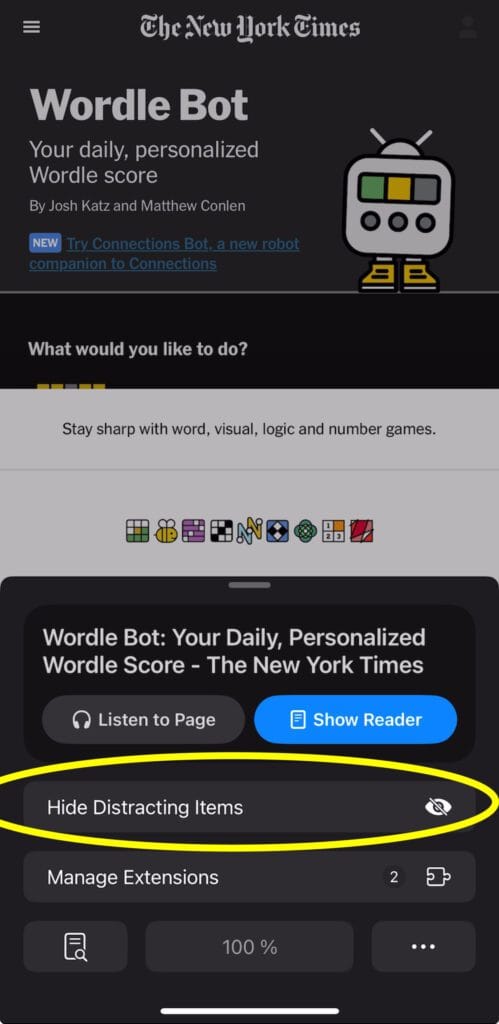
- Tap to select the item that you want to hide. Safari shows a border around the selected item.
- Tap on the Subscription prompt message. Then tap ‘Hide’ to hide it.
- Tap on the underlying pricing information to hide it. Then tap ‘Hide’ to hide it.
- Tap anywhere on the screen. The whole screen will be marked. Then tap ‘Hide’ to hide it.
- Finally, tap Done in the Smart Search field to confirm your changes.
You can also watch the video below where I go through the steps.
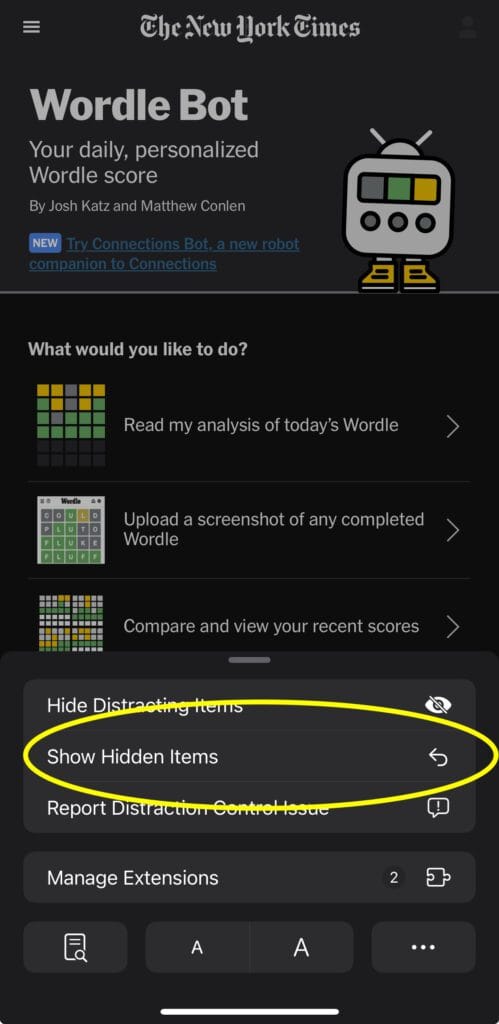
If you are not happy with your selection or if you want to revert any changes you’ve made, you can tap on the Page Menu button again, and select Show Hidden Items.
If you are a Wordle player, you might also want to check my Wordle Helper and Checker tool.